Posts

5 Exciting Robotic Projects for Electronic Makers: From Beginner to Advanced

Image
In today's world, robotics has become an increasingly fascinating and accessible field for electronic enthusiasts and makers. With the advancements in microcontrollers, sensors, and programming platforms, building your own robots has never been easier. Whether you're a beginner looking to embark on your first robotics project or an experienced electronic maker seeking new challenges, we've curated a list of five exciting robotic projects that will enhance your skills and spark your creativity. These projects combine popular electronic components, such as Arduino boards, Raspberry Pi, ultrasonic sensors, Bluetooth modules, RF communication, and computer vision, to create impressive robotic systems. Each project is designed to provide valuable hands-on experience and learning opportunities, catering to a range of skill levels from beginners to advanced users. 1. DIY Fire Fighting Robot using Arduino and Ultrasonic Sensor  If you're interested in robotics and tackling real...

Arduino Tutorial: How to Use OLED Display with Arduino

Image
In the world of microcontrollers and DIY electronics, Arduino boards have revolutionized the way we interact with technology. One exciting component that can greatly enhance your Arduino projects is the Organic Light-Emitting Diode (OLED) display. With its vibrant colors and high contrast, an OLED display brings your projects to life, allowing you to showcase information and create engaging user interfaces. In this article, we will explore the steps to successfully integrate an OLED display with an Arduino board and unlock its full potential. Gathering the Required Components To use an OLED display with Arduino, you will need the following components: Arduino board (e.g., Arduino Uno, Arduino Nano) OLED display module compatible with your Arduino Jumper wires for connecting the display to the Arduino Breadboard (optional but recommended for prototyping) USB cable for Arduino board power and programming Connecting the OLED Display To establish the connection between the OLED display and...

Getting Started with ESP32 using Arduino IDE - Blink LED

Image
The ESP32 is a popular microcontroller platform for Internet of Things (IoT) applications. It offers a wide range of capabilities and can be used for a variety of projects. The Arduino IDE is one of the most popular development environments for the ESP32, as it provides an easy-to-use interface and powerful libraries. In this article, we will explore how to get started with the ESP32 using the Arduino IDE and blink an LED. Setting up the Arduino IDE Before we begin, we need to set up the Arduino IDE to work with the ESP32. First, download and install the latest version of the Arduino IDE from the official website. Then, open the IDE and go to the Preferences menu. In the Additional Boards Manager URLs field, add the following URL: https://dl.espressif.com/dl/package_esp32_index.json . This will allow the Arduino IDE to install the necessary libraries and board definitions for the ESP32. Next, go to the Boards Manager in the Tools menu and search for "esp32". Select the ESP32 ...
Image
Random Access Memory, commonly known as RAM, is a crucial component in modern digital systems. It allows for the temporary storage and retrieval of data in electronic devices. Designing RAM in VHDL (VHSIC Hardware Description Language) is a crucial skill for any digital design engineer, and in this article, we will discuss how to design RAM in VHDL using ModelSim, a popular simulation tool. If you are beginner in VLSI and VHDL, you should go with this article: Getting Started with VLSI and VHDL using ModelSim – A Beginners Guide Before we dive into designing RAM, let us first understand what it is and how it works. RAM is a type of memory that allows for data to be stored and retrieved in any order, hence the term 'random access.' RAM is made up of a series of storage locations, each of which can store a single bit of data. These storage locations are organized into words, with each word containing a fixed number of bits. The size of the RAM is determined by the number of words...

Building Own Sun-Tracking Solar Panel Using Arduino

Image
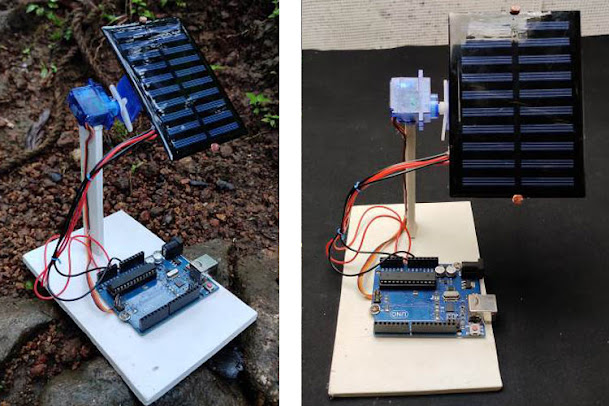
If you're interested in harnessing solar energy to power your home, you might be considering installing solar panels on your roof. However, to get the most out of your panels, you need to ensure that they are pointed directly at the sun throughout the day. This can be accomplished by building a sun-tracking system that automatically adjusts the position of your solar panel based on the movement of the sun.  Project Inspiration : Building your own Sun Tracking Solar Panel using an Arduino In this article, we'll show you how to build a sun-tracking system using an Arduino microcontroller. With this system, your solar panel will always be pointed directly at the sun, maximizing its energy output. The first step in building your sun-tracking system is to gather the necessary components. You'll need an Arduino board, a servo motor, a light sensor, and a few other components that can be easily obtained from an electronics supplier. Once you have your components, you can begin ass...

How DHT22 Temperature and Humidity Sensor Module can be used for Temperature Monitoring Projects?

Image
DHT22 is a temperature and humidity sensor module that can be used to monitor the temperature and humidity levels in various applications. The module consists of a capacitive humidity sensor and a thermistor to measure the temperature. The DHT22 module can be easily interfaced with a microcontroller such as Arduino or Raspberry Pi. The module has a digital output that provides the temperature and humidity readings in a digital format. The data can be accessed using a simple communication protocol, making it easy to use in temperature monitoring projects. One of the most common applications of the DHT22 sensor module is in home automation projects. The module can be used to monitor the temperature and humidity levels inside a room and adjust the temperature and humidity levels accordingly. This can help improve the indoor air quality and create a comfortable living environment. The DHT22 module can also be used in industrial applications such as greenhouses and food storage facilities....

How to Build an IoT-based Fan Speed Controller?

Image
The Internet of Things (IoT) is changing the way we interact with our world, from our homes to our workplaces. One of the most significant impacts of the IoT has been in the area of home automation. With IoT-based devices, you can control and monitor your home's appliances from anywhere in the world, making your life more comfortable and convenient. In this article, we will look at how to build an IoT-based fan speed controller. This project is inspired from  IoT Based Smart Fan Control using ESP8266 and Blynk , you can check out before moving ahead. What is IoT-based Fan Speed Controller? An IoT-based fan speed controller is a device that allows you to control the speed of your fan using a mobile application or a web interface. The device consists of a microcontroller, a motor driver, and a Wi-Fi module. The microcontroller is responsible for receiving commands from the user and sending the corresponding signals to the motor driver, which controls the fan's speed. How to Build...